About CARS24
CARS24 sells cars through a network of dealer partners. Alongside a vehicle, a dealer can sell value-added services such as extended warranty, roadside assistance, buyer protection and maintenance packages.
Overview
Warranty was bought one car at a time, after a sale, through a Relationship Manager. I redesigned the experience so dealers could purchase plans in volume, hold them as stock and activate each unit against a car later. The two halves had to remain legible as one transaction.
My role
I was the product designer on the project in 2025. I owned product thinking, the dealer journey, interaction design, final UI and engineering handover.
Team
Outcomes at a glance
500+
Warranty sales supported in one month after release
14 steps
In the old per-car workflow that the new model replaced
2 flows
Bulk purchase and car-level activation, joined by a unit of stock
The dealer was buying one policy at a time. The business ran in batches.
A dealer might know roughly how many cars would be sold that month, but could not buy warranty capacity ahead of time. Each car reopened a long process across the dealer, a Relationship Manager and Warranty Operations.
Three groups had to make one sale work.
Dealer
Sold the car, requested cover, checked what was available and needed the policy active before delivery.
Relationship Manager
Bridged the dealer and internal teams, including balance lookups, inspection dependencies and status questions.
Warranty Ops
Checked eligibility, processed requests and completed the operational steps needed for issuance.
The design problem was not how to make the same 14 steps look shorter. It was how to stop repeating the purchase for every car.
Four points of friction sat between a dealer and an active warranty.
Repetition
Buying after every sale meant the commercial decision had to be made again for each vehicle.
Invisible stock
Dealers tracked what they believed they owned in spreadsheets, not in the product where they would use it.
Lookups
Relationship Managers answered questions about balance and status that the interface could have answered directly.
Timing
Eligibility, inspection and customer registration still had to happen before a car was delivered. A bulk order alone could not solve activation.
What informed the model
Dealer and internal-team inputs pointed in the same direction: dealers planned for monthly volume, stock lived in spreadsheets, RM calls often asked for balances, and activation had to finish before delivery.
01 / Scope
Warranty first
The commerce model could later serve other value-added services, but warranty had to work end to end first.
02 / Coverage
Underwriter rules stay intact
Bulk stock could not promise cover for a car that failed plan eligibility.
03 / Inspection
Inspection is the source of truth
The interface had to read the inspection record, not replace it with dealer-entered eligibility.
Treat the plan as stock, then spend a unit on a car.
The product model separates the commercial commitment from fulfilment. The journey starts when warranty is discovered in Miles. The bulk-sale screens connect a selected dealership, plan, quantity and payment handoff. Purchased units then become visible in the dealer app, where an eligible unit is assigned to a car and activated after inspection and customer details are complete.
Choose coverage, tenure and quantity; confirm the order.
Available, added to car and activated counts stay visible.
Start from a car or from a purchased plan, with eligibility checked.
Inspection, car verification and customer details complete the policy.
Information architecture / flow
How one order becomes cover for individual cars.
Follow the arrows from discovery and payment to dealer stock. The two redemption paths meet at eligibility before one purchased unit becomes cover for one car.
Scroll sideways to explore the full map.
Read the flow as steps
- Miles app: Open Warranty from Service add-ons and select the dealership.
- Bulk sale: Choose the plan and quantity, review the order and share the payment link. Paid units appear in Purchased Plans.
- Dealer app: Start from Purchased Plans or from a car. Choose one unit and one eligible car.
- Issuance: Check the inspection record, open the redemption cart and review the ₹0 bill, then complete the activation checklist and issue the policy.
- Exceptions: Inspection failure shows a removal or reinspection path. Activate Later moves the car to Pending Activation, where the dealer can resume.
The rules behind the screens
Separate buying from activation without losing the link between them.
Keep quantity, total, savings and unit price together.
Show what is available, assigned and still waiting.
The critical distinctionBuying five warranties does not mean five cars are covered. Each unit becomes a policy only after it is assigned to an eligible car and activation is completed.
From discovery to issued cover.
The Figma work has three connected parts: Miles app discovery, the bulk-sale order and payment handoff, then dealer-app issuance against a specific car. The order buys capacity; issuance turns one unit into cover.
Miles App Discovery
Put warranty where the journey starts.
The Miles home screen lists warranty among the service add-ons and describes it as something that can be sold in advance or in bulk. Choosing a dealership gives the following order a clear owner.
Discovery in Miles
03 screensThe RM finds warranty among dealer services and chooses which dealership the order is for.
01 / HomeWarranty sits under Service add-ons as "Sell in advance / bulk".
02 / Dealership pickerSearch or scroll the RM's dealerships before anything is selected.
03 / Dealership selectedThe chosen dealership enables the next step.
Bulk Sales – Designs
Make the volume decision and payment handoff legible.
Coverage, tenure, quantity and effective unit price belong together. The bulk-sale board also shows a payment link shared with the dealership through the dealer app, WhatsApp and SMS, so the commercial step has a visible handoff rather than disappearing into the next flow.
A plan card makes the threshold visible
Problem identified
A dealer comparing plans could not evaluate a discount without knowing how many units were required.
What I did
The plan comparison places the quantity threshold with coverage and tenure. The dealer can assess the offer before entering the cart.
Budget plans
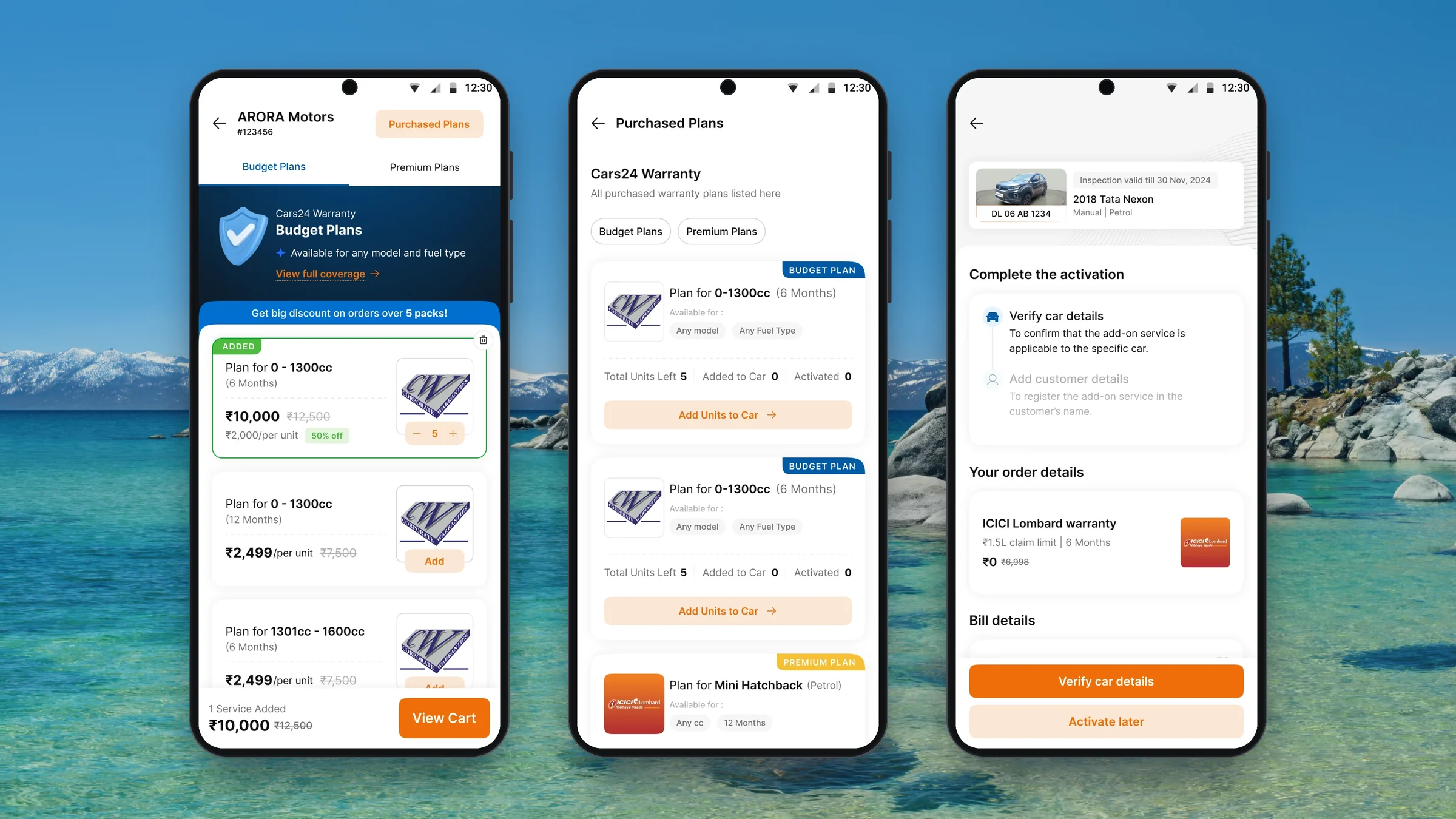
05 screensPlans are listed with the five-pack discount banner. The quantity decision happens in a sheet.
01 / Plan listBudget plans with the discount threshold above the cards.
02 / Quantity sheetNo quantity selected, so Confirm stays disabled.
03 / Five units selectedTotal, unit price and 50% saving update together.
04 / Added to orderThe card switches to a stepper and the cart bar shows the total.
05 / Payment in progressThe cart locks while an earlier payment is pending.
Premium plans
04 screensThe same pattern for premium cover, so a mixed order reads the same way.
01 / Plan listPremium plans for a specific model and tenure.
02 / Quantity sheetDefault state before a quantity is chosen.
03 / One unit selectedA single unit keeps the full unit price.
04 / Mixed orderTwo services in the cart with a combined total.
Coverage details
02 screensEach plan opens a coverage page before purchase.
01 / Budget coverageClaim limit, tenure, cool-off period and covered parts.
02 / Premium coverageThe same structure for premium plans.
Quantity is a deliberate decision
Problem identified
The unit price changes with volume. A premature confirmation would hide the maths of the order.
What I did
A quantity sheet makes selection explicit. The selected quantity, total, savings and effective unit price stay connected on the order and in the persistent cart.
Cart and payment link
04 screensThe RM reviews the order and sends the dealership a link to pay.
01 / CartSelected add-ons, bill details and GST in one view.
02 / Empty cartA prompt to add plans when nothing is selected.
03 / Link sharedSent to the dealer app, WhatsApp and SMS, with a validity timer.
04 / Payment declinedA loading state while a declined request is processed.
Dealer pays the request
04 screensOn the dealer side, the payment request appears in the partner app.
01 / Payment request cardAccept or decline from the Add-ons home.
02 / Request detailsEvery plan, quantity and price before paying.
03 / Request summaryThe validity timer sits above Decline Request and Pay Now.
04 / Decline confirmationDeclining means the RM has to send a new link.
Purchased Plans in Miles
02 screensAfter payment, the RM can see what the dealership holds.
01 / Stock by planUnits left, added to car and activated for each plan.
02 / Nothing sold yetThe empty state for a dealership with no purchased plans.
Payment is not activation.The link can reach the dealership in the dealer app, WhatsApp and SMS. Only after the order is paid do purchased units become stock to use against cars. The next screens answer what remains available and what has actually been issued.
Dealer App Issuance Journey
Turn one purchased unit into cover for one car.
The dealer can start from Purchased Plans or from a car. Both routes meet at unit redemption, then move through eligibility, a ₹0 bill for the already-paid unit and the steps needed to activate the policy. Blocked and pending states keep the unfinished work visible.
Dealer app entry points
05 screensPurchased plans are reachable from the services home, with cars and pending work in tabs.
01 / Add-ons homeWarranty sits beside the other partner services.
02 / Car Care ServicesClaim purchased plans, then finish purchases by car.
03 / Your carsCars ready for an add-on, listed below the claim banner.
04 / Pending ActivationsCars with a unit assigned but no active policy yet.
05 / Blocked car in listThe inspection issue and a removal action appear on the card.
Inventory answers the next question
Problem identified
After the order, the dealer still needs to know what is left and what has happened to each unit. A single purchased count is not enough.
What I did
The Purchased Plans view separates available units from those added to cars and those activated. Expiry and count-drop rules are explained where the balance is shown.
Purchased Plans
05 screensThe plan-level view answers what has been bought and what is left.
01 / Plan inventoryBudget and premium filters with unit counts and Add units to car.
02 / Service tabsWarranty, annual servicing and roadside assistance in one place.
03 / Filter appliedBudget plans only.
04 / Completed ordersPast bulk orders filtered to purchased plans.
05 / Order summaryOrder ID, payment date, GST and the amount paid.
Add units to cars
06 screensThe stock-first path: pick eligible cars against a plan's remaining units.
01 / Select carsNo cars selected, 0 of 5 units used.
02 / Cars selectedThree cars checked and Add Warranty enabled.
03 / AddedA confirmation toast after units are assigned.
04 / All units used5 of 5 selected, so no more cars can be added.
05 / No units leftA prompt to buy more before claiming.
06 / How claiming worksCounts drop only on confirmation, and units expire.
Status per car
05 screensThe Add Ons Added tab tracks each assigned unit until it is active.
01 / Nothing addedThe empty state before any unit is assigned.
02 / Awaiting activationThree cars with Complete Activation actions.
03 / All units assignedFive cars added and none activated yet.
04 / One activatedAn Activation Completed badge on the finished car.
05 / All activatedEvery unit has become an active policy.
Two entry points meet at the same redemption
Problem identified
Some dealers start with a sold car. Others start from the warranty units they have already bought.
What I did
The car detail page offers Redeem Purchased Plans, while inventory offers an eligible-car route. Both lead to selecting a unit for a particular car.
A zero-rupee bill explains itself
Problem identified
A redeemed unit has already been paid for. Showing ₹0 without context could look like a pricing error.
What I did
The redemption cart shows zero cost and says the plan was already purchased. The bill closes the loop between the earlier bulk order and this car.
Car-first redemption
04 screensFrom a car, the dealer redeems a unit already paid for.
01 / Car detailPurchased plans offered first, with units remaining.
02 / Plan addedThe cart bar shows one service at ₹0.
03 / ₹0 cartThe bill explains there is no cost for a redeemed plan.
04 / Order summaryA car-level summary with a ₹0 total.
Activation is a checklist, not one long form
Problem identified
Inspection, vehicle verification and customer details depend on one another. A half-finished form makes it hard to see what remains.
What I did
Three named steps show the work in order. Verification reads the inspection record and asks only for the odometer; customer details finish registration.
Activation
07 screensThree named steps turn the assigned unit into a policy.
01 / ChecklistVerify car details, then add customer details.
02 / Checklist with billThe same checklist with order and bill details below.
03 / Verify car detailsInspection data is read in; odometer and chassis are added.
04 / Car details savedSave and continue moves to the next step.
05 / Customer detailsAadhaar, PAN, name and mobile number.
06 / Documents uploadedUpload states for each document.
07 / Activation completeConfirmation that customer registration is done.
The exception states are part of the flow
A blocked car names the inspection issue and offers removal so the unit is not stranded. “Activate Later” leaves the car in a Pending Activation queue, where the dealer can return to finish the policy.
Exceptions
06 screensInspection problems and removals keep the unit recoverable.
01 / Failed inspectionThe car cannot take warranty; Remove warranty from car.
02 / Remove confirmationThe unit returns to the total count.
03 / RemovedA toast confirms the unit is back in stock.
04 / Inspection expiredThe expiry date is flagged on the car card.
05 / Re-inspection neededBook Re Inspection replaces the first checklist step.
06 / Contact the RMInspection is arranged through the Relationship Manager.
What the released flow supported.
Observed operational volume
Warranty sales supported in one month through the released dealer experience
Dealers could buy plans in volume rather than reopen a purchase for each sold car
Each purchased unit could be applied to a car once eligibility and registration were complete
What I would measure next
- Stock utilisation. How many purchased units are assigned, activated, left unused or expired? The inventory model is only useful if stock turns into cover.
- Activation time and handoffs. Track the time from assigning a unit to an active policy, and count the status lookups and operations tickets that still need a person.